dv
< Projects
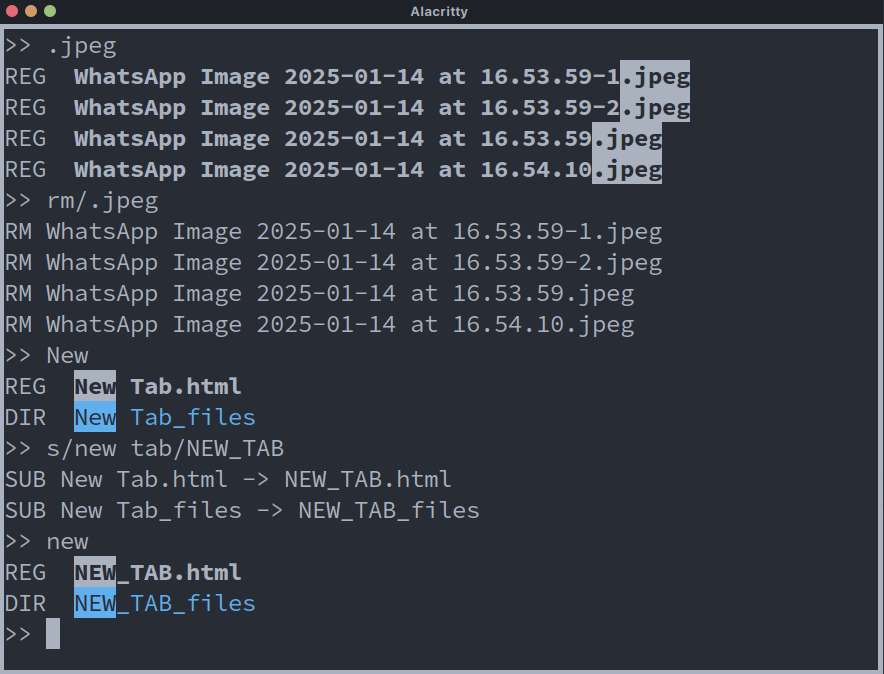
dv (Directory View) is a visual directory management tool: it lists a directory and lets you rename, delete and change permissions of many entries at once using regular expressions.
Warning dv renames and deletes files. Use at your own risk.
Installation
$ git clone https://github.com/hugoocoto/dv
$ cd dv
$ make
$ make install    # optional, to ~/.local/bin
It is also available through the pm user repository.
Commands
Patterns are POSIX basic regular expressions. Commands can be written in lowercase too.
| Command | Description |
|---|---|
PATTERN |
Highlight entries matching the pattern |
S/PATTERN/TEXT |
Replace the pattern with TEXT in matching names |
I/PATTERN/TEXT |
Insert TEXT at the start of matching names |
A/PATTERN/TEXT |
Append TEXT to matching names |
CD/PATTERN |
Change to the first matching directory |
RM/PATTERN |
Delete every matching entry |
PROT/PATTERN/MODE |
Change permissions (octal, as in chmod) |
CLEAR |
Clear the screen |
| Enter | Show every entry in the current directory |
See also
- Source code (GPL-3.0)
Categories:
- Tools and applications